
VCFonVxRail 5.2.1 – vCenter Certificate Renewal Status Shows Failed Even After Updating
When managing VMware Cloud Foundation (VCF) 5.2.1, certificate lifecycle operations are critical to ensure a secure and compliant environment. However, during my day 2 activity i have observed an issue where the vCenter certificate renewal operation shows a “Failed” status in SDDC Manager, even though the certificate update on vCenter was successful.
In this blog, we’ll walk through the symptoms, root cause, and resolution for this problem

🔎 Symptoms
You perform a vCenter certificate renewal from SDDC Manager→ Workload → Certificates.
The certificate is successfully updated on the vCenter Server (you can verify this by checking the vSphere Client login or running certificate validation commands).
Despite the certificate being valid, the SDDC Manager UI shows the status as “Failed”.
Logs in SDDC Manager shows errors under /var/log/vmware/vcf/domainmanager/domainmanager.log related to certificate validation or status reporting.
⚠️ Root Cause
The issue occurs due to a known SDDC workflow issue that causes the vCenter certificate update to fail during the retrust process. This results in the task being marked as failed in the SDDC Manager GUI, even though the underlying certificate replacement may have been applied. Reference KB
While the certificate is correctly updated in vCenter, SDDC Manager fails to update the renewal status in its internal inventory.
Connected to SDDC DB and found the Status as in FAILED Status
Gather the task IDs of the tasks that have failed.

🛠️ Resolution
Step 1: Verify the Certificate on vCenter
Log in to vCenter and check the validity period of the new certificate.
You can run:
openssl s_client -connect <vcenter-fqdn>:443 -showcerts
Take Snapshot for the SDDC Manager VM , as we need to change the status from Failed to SUCCESSFUL
Replace ID in this command with the ID found in the above command

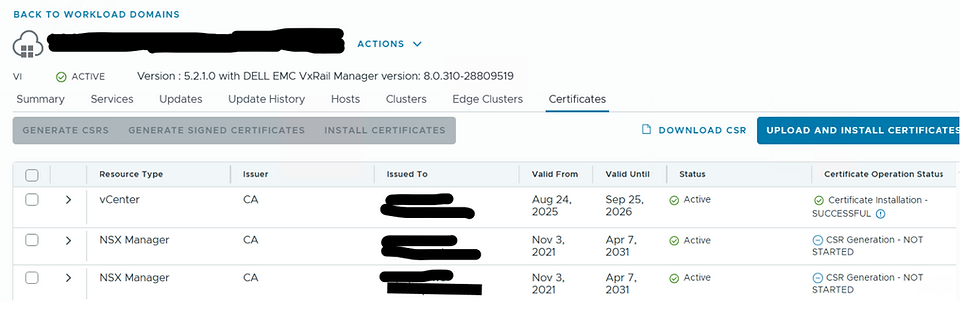
Re Fresh the SDDC GUI Page , you will see the VC Status as Successful installed .


Comments