
How to commission a Host in VMware Cloud Foundation 9
VMware cloud foundation 9 has re-architected how day 2 operations like host commissioning, password change , certification change are handled . In this Blog we will walk through the steps how do we commission a single host or bulk host in VCF 9 .
🚀 Key Change in VCF 9: Host Commissioning Is Now in vCenter
Pre-VCF 9 (e.g. VCF 5.x): Hosts were commissioned and decommissioned via SDDC Manager GUI under Inventory → Hosts.
VCF 9: These tasks have moved to vSphere Client (vCenter) under Hosts → Unassigned Hosts.
This change aligns with broader Day‑2 operational shifts in VCF 9, steering cluster operations progressively into the vCenter/VLCM space.
Before We create a new Workload Domain , we must first commission the host from the existing MGMT VC . Lets us check what are the prerequisites for ESX commission before we move to commission the host.
📦 Commissioning ESX Host Prerequisites
Pre-image with the Correct ESXi Version All hosts must be installed with the supported ESXi version for your VCF environment.
DNS Configuration Hostnames should be fully resolvable in DNS to avoid connectivity and management issues.
Storage Type Selection Decide on the storage type (vSAN, NFS, or vVols) before commissioning. This cannot be changed afterward.
Network Pools Ensure that network pools for management, vMotion, and overlay traffic are created and available prior to host commissioning.
Commissioning Options Hosts can be added individually or in bulk, depending on your deployment needs.
Time Synchronization Enable and configure NTP on all hosts to maintain consistent time settings across the environment
You should verify with your hardware vendor whether a custom ISO with specific drivers is required for your hardware.
ESX host installation is a one-off operation because VMware Cloud Foundation can manage the
software life cycle for the hosts after the hosts are commissioned.
Note : You must consider the storage type before you commission an ESX host. And You must image your hosts with ESX before you commission them , the ESX image build that is part of the bill of materials for VMware Cloud Foundation version that you are using.
Steps to Commission a Host in VCF 9 :
Open the vSphere client -> Global Inventory lists.

Click Resource and Select Hosts

Under hosts -> Click on Unassigned hots - > Click on Commission Hosts

Review all the Check list and Click Proceed.

Fill the host addition details and click Add and Validate

Final Review the details and Click Commission

We can see the host commission process is started in the below vCenter Task

One the host is commission , we need to add the host to the Cluster .
Login to vSphere client -> client to the inventory -> cluster -> Add hosts -> unassigned hosts


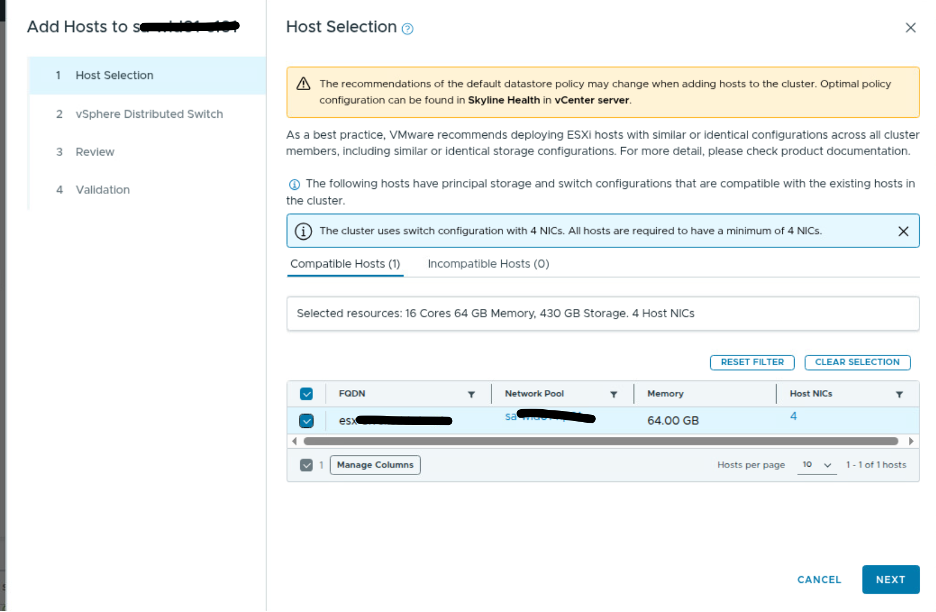
Select the host which we need to add , in my case its only 1 host which is showing .
Review the distributed switch details and Click Next

Validate the Page and Click Finish

Validation will take quite some time , once it return with all box Succeeded -> Click Finish , you will see the new host added into the Cluster lik ebelow

Conclusion
While SDDC Manager still plays a role in lifecycle management, host commissioning is now streamlined via vCenter.
Bulk-Commissioning Hosts can be done via JSON Template a maximum of 50 hosts at a time.


Comments