
VCF 9 Deploying the VCF Operations for Logs 9 Appliance
In VMware Cloud Foundation 9 (VCF 9), the VCF Operations for Logs component (Earlier called “VRLI”) is the centralized log ingestion and analytics engine. It replaces or integrates with traditional vRealize Log Insight systems, bringing unified visibility into VCF infrastructure events, logs, and alerts. To deploy it properly, you must choose an appropriate deployment model, follow prerequisites, and integrate it tightly into your management domain.
Why deploy VCF Operations for Logs?
VCF Operations for Logs centralizes log ingestion, search and analytics across vCenter, NSX, SDDC Manager and ESXi hosts so your ops and security teams can troubleshoot faster and correlate events across the SDDC. In VCF 9 this is typically deployed as a Day-2 component and registered into Fleet Management. lets see types of Deployment Modes and Methods , before we jump into the details steps by steps of deployment .
Deployment Modes
There are 2 deployment modes available:
Standard: A single VCF Operations for Logs node is deployed. Availability is provided by the vSphere HA functionality within the vSphere cluster.
High-Availability: This model features a three-node deployment behind an internal load balancer. This setup ensures resilience at both the application layer—via a clustered deployment—and the infrastructure layer, through vSphere HA and DRS capabilities.
Deployment Methods:
Fleet Manager (Recommended): Within VCF Operations, you can use the Fleet Manager’s Lifecycle section to deploy a new VCF Operations for Logs instance or import an existing one. This method streamlines the process and integrates it with your VCF environment.
Manual OVA Deployment: You can also deploy the VCF Operations for Logs appliance manually from vCenter using its OVA file and then import it into Fleet Manager for centralized management.
Step 1 : Login to VCF Operations With Admin

Step 2: Navigation Pane on the left , Click Fleet Management -> Lifecycle

Step 3 : On the Right side we will see the components which to be deployed. in our case we select Operations-logs to Click on ADD

Step 4 : Once you click Add , it will ask you to select the Version of the product i.e. logs operations and deployment type or new installation or importing exiting one , in our case we are doing fresh installation . Select New Install and Standard Click Next

Step 5 : Generate Certificate , Click on the + and Generate Certificate

Step 6 : Fill the Alias , CN , Oragnization (O) , Organization (OU) , Country Code (C) , Locality , State , Key Length , Server Domain/FQDN , IP Address and Click Generate

Step 7 : From the Drop down menu select the Newly Generated Certificate and Click Next

Step 8 : Select the vCenter Name , Cluster Name , Select Folder , Select Network , Select Datastore , Select Disk Mode , Disable Use content Library and Click Next

Step 9 : Enter the Network Details here and Click Next

Step 10: Here We need to select the Size of the node ,FIPS compliance mode , Certificate , Configure cluster VIP , admin email , components passwords , Time sync mode , NTP , VM name , FQDN , IP Address and Click Next


Step 11 : RUN PRE-CHECK , verify that all the pre-checks are completed without errors and Click Next

Step 12 : Click Submit , this will take 60 to 70 minutes . VCF operations for logs is deployed in different stages and you can monitor the deployment status under tasks.
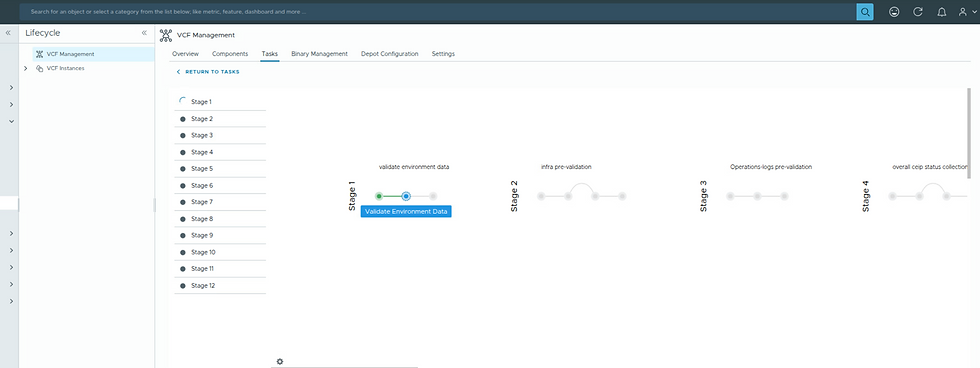
Deployment Completed Sucessfully HURRAYYYYY!!!!!

Verify Your VCF Operation for Logs UI
1. Open the VCF operation for logs URL on browser

This is how it will look once you login to the VCF operation for Logs

The VCF Operations for Logs 9 appliance brings centralized visibility and advanced log analytics to VMware Cloud Foundation 9. By properly planning DNS, networking, and integration steps, you can deploy it seamlessly and enhance observability across your private cloud.
With this component in place, your operations team gains powerful insight and faster troubleshooting capabilities—making VCF 9 a true end-to-end, enterprise-grade platform


Great post, this guide makes the deployment process much easier to understand step by step. I like how you explained the setup and options clearly, especially for beginners working with VCF logs. It’s interesting how smooth system setups and organized logs can improve workflows, just like how a built in refrigerator helps keep a kitchen clean and well managed.